Syntelog Identification in Diploid Rice
Overview
This tutorial demonstrates how to run the syntelogfinder pipeline on a rice dataset. In additions We’ll use long-read RNA-seq data from the cultivar Nipponbare to run longrnaseq pipeline and quantify the allele-specific gene and isofrom expression.
What you’ll learn:
How to prepare a phased reference genome with annotations
How to identify syntelogs using the syntelogsfinder pipeline
How to analyze long-read RNA-seq data with the longrnaseq pipeline
Part 1: Preparing the Phased Reference Genome
Step 1.1: Download the Phased Assembly
Download the two haplotype assemblies for rice cultivar Nipponbare:
Step 1.2: Download Reference Annotation
Since the phased assembly lacks gene annotations, we’ll use the NIP-T2T assembly annotation and transfer it to our phased assembly using liftoff.
Download the following files:
Reference annotation (gff): https://ftp.ebi.ac.uk/pub/databases/ena/wgs/public/2022/20220330/GWHAAZT00000000/GWHAAZT00000000.gff3.gz
Reference genome (fasta): http://www.ricesuperpir.com/uploads/common/genome_sequence/NIP-T2T.fa.gz
Step 1.3: Rename Chromosomes
Before running liftoff, rename the chromosomes in both the fasta and gff files from the phased assembly to match this pattern:
Haplotype 1:
GWHEQCR00000001 → chr1_1
GWHEQCR00000002 → chr2_1
… (continue for all 12 chromosomes)
Haplotype 2:
GWHEQCS00000001 → chr1_2
GWHEQCS00000002 → chr2_2
… (continue for all 12 chromosomes)
Part 2: Transferring Annotations with Liftoff
Step 2.1: Run Liftoff
Create a feature types file and run liftoff for both haplotypes:
# Create feature types file
echo -e "gene\nmRNA\nexon\nCDS\nfive_prime_UTR\nthree_prime_UTR" > $WORK_DIR/liftoff/feature_types.txt

# Define chromosomes array
chromosomes=(1 2 3 4 5 6 7 8 9 10 11 12)

# Process each haplotype
for haplotype in 1 2 ; do
    # Create chromosome mapping file
    chr_map_file="$WORK_DIR/liftoff/chr_map_${haplotype}.csv"
    > $chr_map_file

    for chr in ${chromosomes[@]}; do
        echo $chr
        echo -e "Chr${chr},chr${chr}_${haplotype}" >> $chr_map_file
    done

    # Run liftoff
    liftoff -g $WORK_DIR/genome/NIP-T2T.gff3 \
            -o $WORK_DIR/liftoff/Hap${haplotype}.genome.gff \
            -f $WORK_DIR/liftoff/feature_types.txt \
            -chroms $chr_map_file \
            -p 16 \
            -a 0.9 \
            -s 0.9 \
            -copies \
            $WORK_DIR/genome/Hap${haplotype}_GWHEQC.genome.renamed.fasta \
            $WORK_DIR/genome/NIP-T2T.fa
done
Parameters explained:
-p 16: Use 16 CPU cores-a 0.9: Minimum alignment coverage of 90%-s 0.9: Minimum sequence similarity of 90%
Step 2.2: Add Haplotype Suffixes to Gene IDs
To avoid duplicate gene IDs between haplotypes, add suffixes to the gene IDs in each gff file:
Haplotype 1:
AGIS_Os01g000010 → AGIS_Os01g000010_hap1
Haplotype 2:
AGIS_Os01g000010 → AGIS_Os01g000010_hap2
Step 2.3: Merge Haplotype Files
Combine the fasta and gff files from both haplotypes:
# Merge gff files
cat $WORK_DIR/liftoff/Hap1.genome.renamed.gff \
    $WORK_DIR/liftoff/Hap2.genome.renamed.gff \
    > $WORK_DIR/liftoff/Hap1_2_Nipponbare.genome.renamed.gff

# Merge fasta files
cat $WORK_DIR/genome/Hap1_GWHEQC.genome.renamed.fasta \
    $WORK_DIR/genome/Hap2_GWHEQC.genome.renamed.fasta \
    > $WORK_DIR/genome/Hap1_2_Nipponbare.renamed.fasta
Part 3: Running the Syntelog Finder Pipeline
Step 3.1: Prerequisites
Install Nextflow
Install Conda
Clone the syntelogsfinder repository (https://github.com/NIB-SI/syntelogfinder)
Step 3.2: Configure Parameters
Create a parameters file at params/rice.json:
{
    "reference_fasta": "genome/Hap1_2_Nipponbare.renamed.fasta",
    "reference_gff": "liftoff/Hap1_2_Nipponbare.genome.renamed.gff",
    "ploidy": 2,
    "outdir": "output_rice_Nip"
}
Step 3.3: Execute the Pipeline
Run the syntelog finder pipeline:
nextflow run main.nf \
    -params-file params/rice.json \
    -c conf/nextflow.config \
    -profile conda
Step 3.4: Understanding the Results
The main outputs are located in output_rice_Nip/03_GENESPACE/:
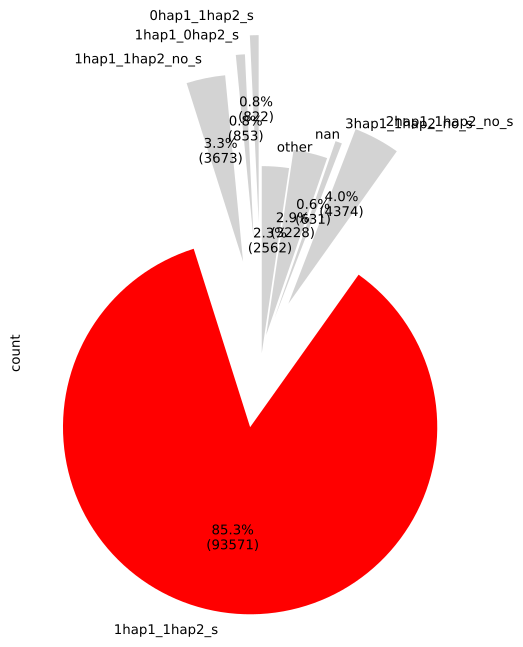
1. Pie Chart (Hap1_2_Nipponbare.genome.renamed_genespace_pie_chart.svg)
Shows the distribution of syntelog categories.
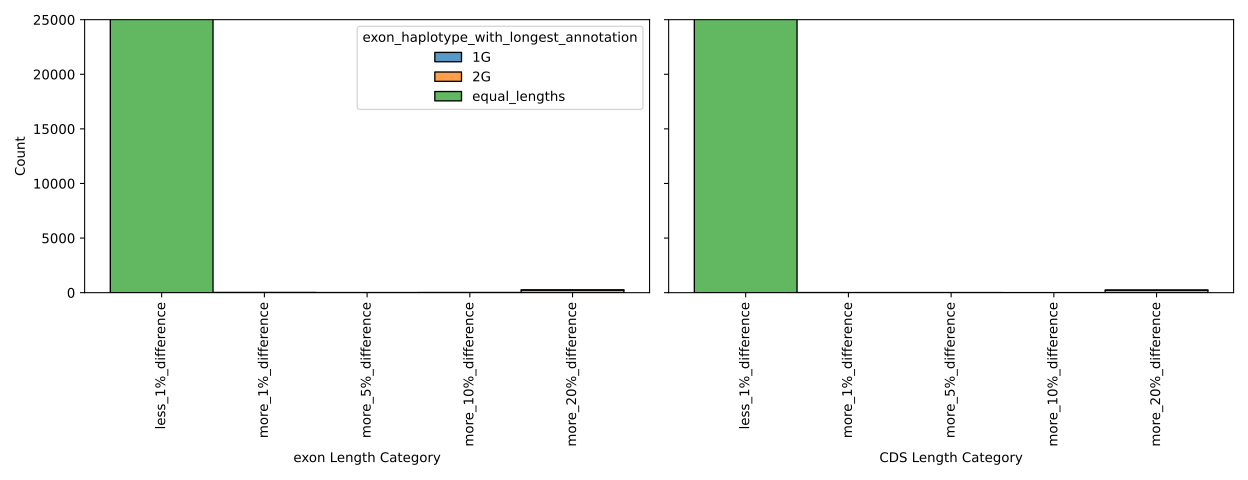
2. Combined Bar Plots (Hap1_2_Nipponbare.genome.renamed_genespace_combined_barplots.svg)
Displays detailed statistics for each syntelog category. Exon lengths should be very similar between gene pairs since we used lifted annotations.
Part 4: Long-Read RNA-Seq Analysis
Step 4.1: Clone the Pipeline
git clone https://github.com/nadjano/longrnaseq
Step 4.2: Download RNA-Seq Data
Download the six RNA-seq samples from NCBI:
Dataset: SRP576785
Samples:
Three from “Early” tillering stage: SRR32998145, SRR32998146, SRR32998137
Three from “Late” tillering stage: SRR32998141, SRR32998142, SRR32998143
Place all fastq files in the fastq/ directory.
Step 4.3: Prepare Sample Sheet
Create assets/sample.csv:
sample,fastq_1
SRR32998137,fastq/SRR32998137.fastq
SRR32998141,fastq/SRR32998141.fastq
SRR32998142,fastq/SRR32998142.fastq
SRR32998143,fastq/SRR32998143.fastq
SRR32998145,fastq/SRR32998145.fastq
SRR32998146,fastq/SRR32998146.fastq
Step 4.4: Add Organellar Genomes
Important: Add organellar sequences (mitochondria and chloroplast) to your reference genome to prevent misalignment of organellar transcripts to the nuclear genome.
Download organellar genomes from: https://www.ncbi.nlm.nih.gov/datasets/organelle/
Append these sequences to your reference fasta and add corresponding annotations to your gtf file.
Step 4.5: Run the longrnaseq Pipeline
nextflow run main.nf -resume -profile singularity \
    --input assets/sample.csv \
    --outdir output_rice_Nip \
    --genome genome/Hap1_2_Nipponbare.renamed.organels.fasta \
    --gtf genome/Hap1_2_Nipponbare.genome.renamed.organels.standard.gtf \
    --centrifuge_db centrifuge/dbs_v2018/ \
    --sqanti_dir sqanti3/release_sqanti3 \
    --bg \
    --technology ONT \
    --skip_sqanti
Note
The --skip_sqanti flag is used here; see https://github.com/nadjano/longrnaseq for additional details on SQANTI configuration.
Expected runtime: Approximately 4 hours on a server with 60 CPU cores and 200 GB RAM (runtime varies based on fastq file size and available resources).
Troubleshooting
long-rnaseq pipeline issues: * BAMBU: gene_ids in the gtf file are essential for BAMBU to work correctly. Ensure that your gtf file contains gene_id attributes for each transcript.